ANSI escape sequences are a standard for in-band signaling to control
cursor location, color, font styling, and other options on video text
terminals and terminal emulators. Certain sequences of bytes, most
starting with an ASCII escape character and a bracket character, are
embedded into text. The terminal interprets these sequences as commands,
rather than text to display verbatim.
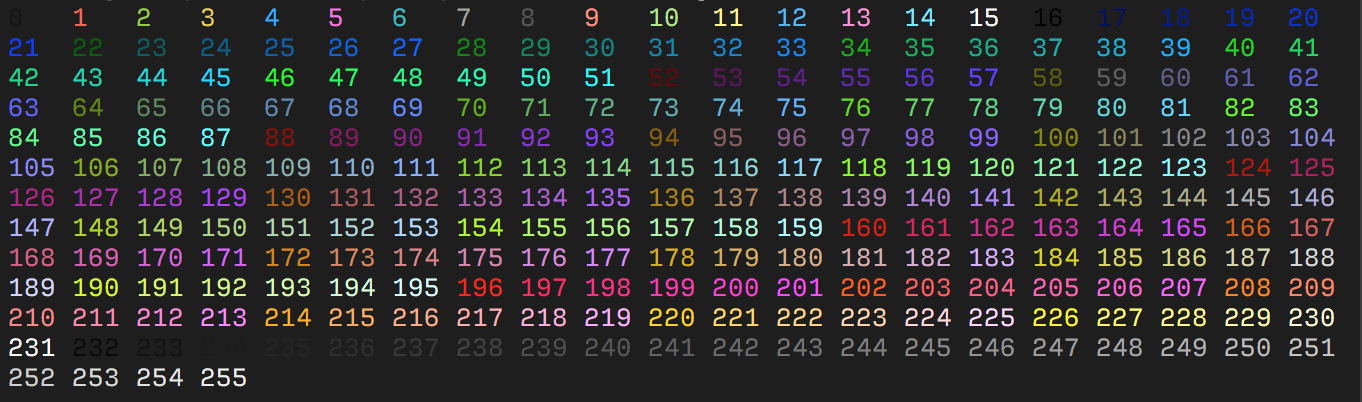
Most terminals support 8 and 16 colors, as well as 256 (8-bit)
colors. These colors are set by the user, but have commonly defined
meanings.
8-16 Colors
Color Name
Foreground Color Code
Background Color Code
Black
30
40
Red
31
41
Green
32
42
Yellow
33
43
Blue
34
44
Magenta
35
45
Cyan
36
46
White
37
47
Default
39
49
Most terminals, apart from the basic set of 8 colors, also support
the “bright” or “bold” colors. These have their own set of codes,
mirroring the normal colors, but with an additional ;1 in
their codes:
1
2
3
4
# Set style to bold, red foreground.
\x1b[1;31mHello
# Set style to dimmed white foreground with red background.
\x1b[2;37;41mWorld
Terminals that support the aixterm
specification provides bright versions of the ISO colors, without
the need to use the bold modifier:
Color Name
Foreground Color Code
Background Color Code
Bright Black
90
100
Bright Red
91
101
Bright Green
92
102
Bright Yellow
93
103
Bright Blue
94
104
Bright Magenta
95
105
Bright Cyan
96
106
Bright White
97
107
256 Colors
The following escape codes tells the terminal to use the given color
ID:
ESC Code Sequence
Description
ESC[38;5;{ID}m
Set foreground color.
ESC[48;5;{ID}m
Set background color.
Where {ID} should be replaced with the color index from
0 to 255 of the following color table:
256 Color table
0-7: standard colors (as in
ESC [ 30–37 m)
8–15: high intensity colors (as in
ESC [ 90–97 m)
16-231: 6 × 6 × 6 cube (216 colors):
16 + 36 × r + 6 × g + b (0 ≤ r, g, b ≤ 5) >
Some emulators interpret these steps as linear increments
(256 / 24) on all three channels while others may
explicitly define these values.
232-255: grayscale from dark to light in 24 steps.
RGB Colors
More modern terminals supports Truecolor
(24-bit RGB), which allows you to set foreground and background colors
using RGB.
These escape sequences are usually not well documented.
ESC Code Sequence
Description
ESC[38;2;{r};{g};{b}m
Set foreground color as RGB.
ESC[48;2;{r};{g};{b}m
Set background color as RGB.
Note that ;38 and ;48 corresponds to the 16
color sequence and is interpreted by the terminal to set the foreground
and background color respectively. Where as ;2 and
;5 sets the color format.
if (cimg.header.version != 2) { puts("ERROR: Unsupported version!"); exit(-1); }
if (cimg.header.width != 46) { puts("ERROR: Incorrect width!"); exit(-1); }
if (cimg.header.height != 23) { puts("ERROR: Incorrect height!"); exit(-1); }
unsignedlong data_size = cimg.header.width * cimg.header.height * sizeof(pixel_t); pixel_t *data = malloc(data_size); if (data == NULL) { puts("ERROR: Failed to allocate memory for the image data!"); exit(-1); } read_exact(0, data, data_size, "ERROR: Failed to read data!", -1);
for (int i = 0; i < cimg.header.width * cimg.header.height; i++) { if (data[i].ascii < 0x20 || data[i].ascii > 0x7e) { fprintf(stderr, "ERROR: Invalid character 0x%x in the image data!\n", data[i].ascii); exit(-1); } }
display(&cimg, data);
for (int i = 0; i < cimg.header.width * cimg.header.height; i++) { if (data[i].r != 0x8c || data[i].g != 0x1d || data[i].b != 0x40) won = 0; }
int num_nonspace = 0; for (int i = 0; i < cimg.header.width * cimg.header.height; i++) { if (data[i].ascii != ' ') num_nonspace++; } if (num_nonspace != 1058) won = 0;